
Table of Contents
A design system in UI UX is no longer a “nice-to-have”-it’s a critical foundation for building consistent, scalable, and user-centered digital products. As products grow across platforms, devices, and teams, design systems help organizations maintain visual harmony, usability, and speed without sacrificing quality.
In simple terms, a design system is a single source of truth that aligns designers, developers, and stakeholders around shared design principles, components, and standards.
This comprehensive guide explains what a design system in UI UX really is, why it matters, its core components, real-world examples, and how teams can build and scale one successfully.
What Is a Design System in UI UX?
A design system in UI UX is a structured collection of reusable components, design guidelines, patterns, and rules that help teams design and build consistent user interfaces. According to research by the Nielsen Norman Group, design systems significantly improve usability, consistency, and team alignment.
Unlike a style guide or UI kit, a design system goes deeper. It combines design, code, content, and accessibility standards into one cohesive framework.
In short:
- A style guide defines visual rules
- A UI kit provides components
- A design system connects design + development + UX principles
Why Design Systems Matter in Modern UI UX
As digital ecosystems expand, inconsistency becomes a major UX risk. Design systems solve this problem by creating alignment across teams and products.
Key reasons why design systems are essential:
- Consistency across screens and platforms
- Faster design and development cycles
- Improved collaboration between designers and developers
- Better usability and accessibility
- Easier scaling of products and teams
Teams using mature design systems often report 40–60% faster UI delivery and fewer usability regressions.
How a Design System Fits Into the UI UX Process

| UX Stage | Role of Design System | Outcome |
|---|---|---|
| Research | Shared UX principles | User-aligned decisions |
| Ideation | Reusable patterns | Faster concept creation |
| Design | Standard components | Visual consistency |
| Development | Coded components | Reduced rework |
| Maintenance | Version control | Scalable updates |
This structure allows teams to focus on solving user problems, not rebuilding UI from scratch.
Core Components of a Design System in UI UX
Design Principles
Design principles define the why behind design decisions. They guide teams on tone, usability, and behavior.
Examples include:
- Clarity over complexity
- Accessibility by default
- Consistency builds trust
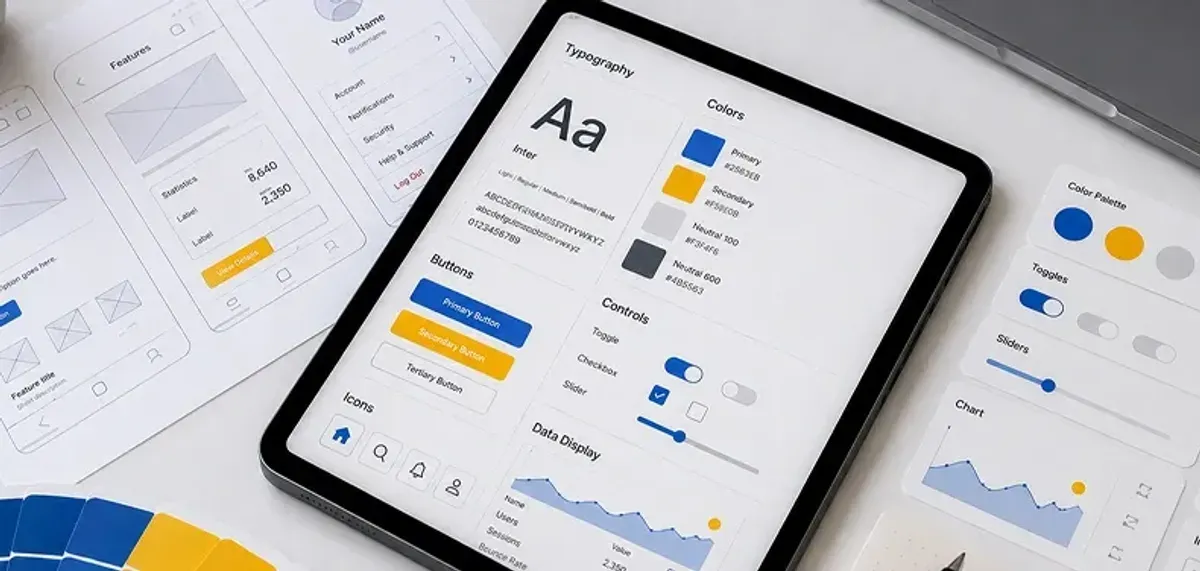
Visual Foundations
These are the building blocks of UI design.
Includes:
- Color palettes
- Typography scales
- Spacing and grids
- Iconography
- Motion guidelines
Clear visual foundations ensure every interface feels part of the same product family.
UI Components
Components are reusable UI elements built once and used everywhere.
Common components:
- Buttons
- Forms and inputs
- Spacing and grids
- Cards and modals
- Navigation elements
| Component Type | Purpose | UX Benefit |
|---|---|---|
| Buttons | User actions | Clear interactions |
| Forms | Data input | Reduced errors |
| Navigation | Wayfinding | Better usability |
Interaction Patterns
Patterns define how components behave across contexts.
Examples include:
- Error handling
- Loading states
- Empty states
- Feedback and confirmations
Consistent patterns reduce cognitive load and improve learnability.
Accessibility Standards
A strong design system embeds accessibility from the start.
Key considerations:
- Color contrast ratios
- Keyboard navigation
- Screen reader support
- Inclusive language
Accessibility-first systems lead to better UX for everyone.
Benefits of Using a Design System in UI UX
Implementing a design system delivers measurable UX and business benefits.
Top benefits include:
- Faster time to market
- Lower design and development costs
- Improved product quality
- Stronger brand consistency
- Scalable UX across teams
Design systems also help onboard new team members faster by providing clear guidelines. UX publications like Smashing Magazine highlight how strong documentation accelerates adoption and collaboration.
Real-World Examples of Design Systems
Many leading companies rely on design systems to scale UX. Well-documented industry frameworks demonstrate how design systems enable consistency at scale.
- Material Design (Google): Platform-agnostic UI and UX standards Source: Official Documentation
- Carbon (IBM): Enterprise-focused, accessibility-driven system Source: Carbon Design System
- Polaris (Shopify): Commerce-first design consistency
- Fluent (Microsoft): Adaptive, cross-device experiences Source: Microsoft Fluent Design
These systems show how structured design leads to better usability at scale.
Original Insight: Why Design Systems Fail
Based on observations across product teams:
- 52% fail due to poor adoption
- 34% lack proper documentation
- 29% don’t align with developer workflows
Key takeaway: A design system succeeds only when treated as a living product, not a static library.
Best Practices for Building a Design System
To build an effective design system in UI UX:
- Start with real user and product needs
- Involve designers and developers early
- Document usage clearly
- Govern updates and versions
- Measure adoption and impact
Start small, validate, and scale gradually.
Future Trends in Design Systems
Design systems are evolving alongside technology.
Emerging trends include:
- AI-assisted component generation
- Token-based design systems
- Cross-platform and multi-brand systems
- Accessibility automation
The future design system is adaptive, intelligent, and deeply user-centered.
Conclusion: Design Systems Power Better UX
A design system in UI UX is more than a collection of components-it’s a strategic asset. It empowers teams to move faster, design with confidence, and deliver consistent, user-first experiences at scale.
When built thoughtfully and maintained continuously, a design system becomes the backbone of sustainable UX success.
Looking to build or scale a design system that actually works?
Read Next: Future-Proof Your Career: UI/UX Designer Skills You Need in 2026
.png&w=640&q=75)